

Managing a distributed or hybrid team means balancing visibility with trust, and at some point, timesheets stop being enough. I’ve spent time on both sides of that equation: as someone who’s been monitored and as someone responsible for team output. That dual perspective shaped exactly what I looked for when I sat down to evaluate the best employee monitoring software.
If you’ve landed on this page, you already know your team needs better visibility into productivity, attendance, or workflow patterns. What you need now is clarity on which tool actually delivers, without creating friction, eroding trust, or drowning your HR team in configuration overhead.
I reviewed 40+ tools on G2 and compared user reviews, features, and satisfaction ratings to conduct a hands-on evaluation. I focused on what matters most to HR and operations leaders: activity-tracking accuracy, reporting depth, ease of setup, integration flexibility, and the tool’s ability to navigate the line between oversight and micromanagement.
My top 8 picks are: Hubstaff, Time Doctor, We360.ai, Time Champ, DeskTime, Teramind, Insightful, and ActivTrak.
Whether you’re an HR leader trying to reduce absenteeism, an operations manager tracking output from distributed teams, or a business owner looking for your first structured monitoring setup, this list has something for you.
8 Best Employee Monitoring Software for 2026: My Top Picks
- Hubstaff: Best employee monitoring software for time tracking and billing Simplifies timesheets, billable hours, and productivity tracking for remote and hybrid teams. (Pricing starts at $4.99/seat/month)
- Time Doctor: Best for workforce analytics and performance management Offers detailed reports on productivity, goals, and project timelines to optimize team efficiency. (Plans start from $6.67/user/month)
- We360.ai: Best for live activity and web usage monitoring
Tracks live chats, social media, and web activity to provide real-time visibility into employee performance. (Plans start from $4.59/month) - Time Champ: Best for productivity and workflow automation
Automates reminders and task management while tracking overall operational efficiency. (Plans start from $3.9/month) - DeskTime: Best for project tracking and scheduling
Combines project management with time tracking, shift planning, and absence scheduling tools. (Plans start from $6.42/month) - Teramind: Best for insider threat detection and data security
Provides advanced monitoring with web restrictions, keystroke logging, and behavioral analytics. (Plans start from $14/seat/month) - Insightful: Best for team performance tracking and project analytics
Enables real-time monitoring, project accounting, and detailed productivity reports. (Plans start from $8/seat/month) - ActivTrak: Best for behavioral insights and productivity analysis
Tracks employee activity to help managers understand work habits and improve performance discipline. (Plans start from $10/user/month)
*These employee monitoring software are top-rated in their category, according to G2 Summer 2026 Grid Reports. I’ve also added their monthly pricing to make comparisons easier for you.
8 best employee monitoring tools I evaluated for 2026
The employee monitoring software category is steadily rising. The global market was valued at $648.8 million in 2025 and is projected to grow from $719.8 million in 2026 to $1.7 billion by 2034, at a CAGR of 12.10%.
That growth isn’t happening in a vacuum. According to ExpressVPN’s 2025 workplace surveillance report, 74% of U.S. employers now use online tracking tools, and 61% have adopted AI-powered analytics to measure productivity. Monitoring has moved from exception to default.
But adoption alone doesn’t tell the whole story. Only 22% of employees report knowing they’re being monitored online, even as three in four companies use monitoring tools, and 56% of workers say workplace surveillance causes them stress and anxiety. That gap between employer intent and employee experience is exactly what makes tool selection so critical. The wrong setup doesn’t just fail operationally; it actively damages trust.
Having tangible knowledge of which features can clinically track employee performance and which simply strain the employee experience is necessary as you sit down to evaluate the best employee software. In keeping with my extensive experience as an employee, I have tried my best to give the gist of all the tools that I analyzed.
How did I find and evaluate the best employee monitoring software?
I started with the latest G2 Grid Report for employee monitoring software and evaluated factors such as G2 scores, G2 ratings, ease of use, ease of admin, customer segments, and market satisfaction to arrive at the final list.
I spent weeks evaluating employee monitoring tools across pricing, features, usability, and real-world performance. I used AI to identify recurring patterns in G2 reviews and surface consistent themes in feedback around productivity-tracking accuracy, reporting transparency, and ease of setup.
To validate my findings, I compared G2 review patterns against peer insights, product documentation, and public resources to separate well-marketed tools from those genuinely improving operational efficiency.
All product data, pricing details, and screenshots are sourced from G2 listings and publicly available materials.
What makes employee monitoring software worth it? My selection criteria
I tested core functions across all eight tools, including time tracking, activity dashboards, custom reporting, URL monitoring, and attendance management, to distinguish features that improve team visibility from those that merely add noise.
These six criteria drove every evaluation decision:
- Comprehensive activity tracking: I found that not tracking employee activity can potentially lead to employee absenteeism and cause a distraction at large. So, if a tool provides custom, real-time monitoring of employee actions, routine behavioral analysis, status on scheduled projects and tasks, and computation of average work hours, it means you’d get these real-time updates without setting up continuous 1x1s throughout the day and disrupting employees’ workflow.
- Integration with project management and productivity tools: Having strong third-party integrations with project management tools like Trello, Slack, Asana, or ClickUp helped me see the real-time transition of employee efforts into project goals and milestones. It also helped me spot gaps in employee task submissions and link them to existing project challenges, scope creep, or persistent client complaints or demands. I found it essential to know whether employee actions were being converted into tangible goals.
- Time tracking and attendance: I haven’t mentioned any tools that don’t offer this functionality since it is the most basic and crucial part of employee monitoring software. Since I have always had a fixed time to punch in via the remote HR system, this minute detail should never be overlooked, as it indicates how many employees are present or on leave. My testing focused on the attendance management details to ensure employees’ presence is recorded, and leaves are adjusted accordingly throughout the year.
- Robust privacy controls and compliance: I also made a point of including employee monitoring tools that align with recent policy changes and labor laws and that comply with local, state, and federal regulations. As labor laws continue to change, the software should receive alerts and updates and keep the team informed to stay on the same page and comply with legal requirements.
- Automated URL and application monitoring: If I could get the facility to track the URLs employees visit, it would make employees more disciplined and aware of what to search for during work hours. Automated URL and application monitoring would track employee use of specific applications and websites and indicate whether that usage is relevant to your departmental goals.
- User behavior analytics: Another feature I cannot let go of. Having a repository of task progress, project updates, comments, feedback cycles, and day-to-day work progress, and customizing this into personalized performance reports with actionable metrics, is vital to determining whether employees are following the right course of action and maintaining the right conduct.
- Stealth mode monitoring: This feature seemed pretty helpful for discreetly monitoring employee activities and receiving real-time project updates, ensuring everything is on track and teams are headed in a positive direction. Discreetly monitoring employee activities prevents you from interrupting their workflows or micromanaging them to request task updates.
- Cloud storage access: Considering the employee count and data volume, reliable cloud storage access was also non-negotiable for me. Larger cloud storage access was helpful when I wanted to share, collaborate, or migrate data between systems without worrying about system shutdowns or outages.
The list below contains genuine user reviews of employee monitoring software. To be included in this software category, a solution must:
- Monitor employee activity using remote behavior-tracking tools such as location tracking, screen activity, and browser history.
- Oversee employee computers to ensure a consistent level of productivity
- Archive activities for future quality review.
*This data was pulled from G2 in 2026. Some reviews may have been edited for clarity.
1. Hubstaff: Best employee monitoring software for time tracking and billing
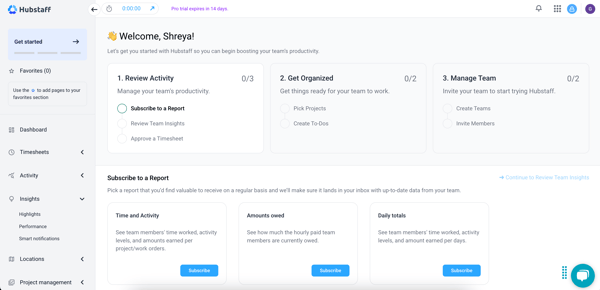
Hubstaff really makes the invisible visible. Whether you’re managing a five-person remote team or a distributed workforce across time zones, it puts hours, activity levels, screenshots, and payroll into a single dashboard that doesn’t require a manual to operate.
What I loved most about Hubstaff was that it tracked employees’ activities and kept me informed about what was on everyone’s plate. It automatically records work hours without requiring employees to clock in manually, tracks active versus idle time to the minute, and logs app and URL usage throughout the day. I could pull up any team member’s activity at a glance — no follow-up messages, no guesswork. G2 Data shows Hubstaff scores 94% for productivity and hours tracking, the highest in the category.
I didn’t know any tool would offer such a detailed and personalized reporting feature as Hubstaff. It helped me generate activity summaries, track app URLs, log time taken, and even filter reports for a specific date and time. Whether you are prepping for an upcoming meeting or performance cycles, custom reporting helps save a lot of time.
Screenshot monitoring adds a layer of accountability that timesheets alone can’t provide. Hubstaff captures periodic screenshots during tracked sessions, giving managers visual confirmation of what employees are working on, without requiring real-time surveillance. G2 Data rates Hubstaff’s screenshots monitoring features at 91%, signaling growing strength in automated reporting.
Third-party integrations are another area where Hubstaff pulls ahead. It connects cleanly with Asana, Trello, Slack, Jira, and payroll platforms, so activity data flows directly into the tools where work actually happens. I could see time logged against specific tasks in Asana without switching apps, which made project accounting significantly easier.
According to G2’s 2026 Employee Monitoring Grid Report, Hubstaff maintains a 91% satisfaction rating for web & application usage activity tracking. Users also rated its AI-driven text generation and summarization features at 79%, signaling its growing strength in AI-powered reporting. These high satisfaction scores highlight how intuitiveness and automation blend well to streamline workforce analytics.
Hubstaff handles PTO tracking, shift scheduling, and leave management from the same dashboard. Reviewers in HR roles consistently cited attendance management as a feature they rely on daily. Moreover, GPS and location tracking extend Hubstaff’s utility beyond desk-based teams. For organizations with field employees, delivery staff, or teams that move between client sites, real-time location tracking closes the visibility gap that remote monitoring alone can’t address.
That said, some G2 reviewers mention that pricing can feel higher for smaller teams or freelancers, especially compared to lighter tools. However, this aligns with Hubstaff’s positioning as an enterprise-ready solution built for teams that need automation, GPS tracking, and performance analytics, features that justify the cost for businesses seeking scalability and depth rather than basic tracking.
Hubstaff’s activity metrics are also praised for focusing on engagement trends over micromanagement, allowing leaders to assess productivity more meaningfully. A few users note that the data can vary depending on the type of work being tracked (e.g., creative vs. operational tasks), but this broader approach makes Hubstaff a strong fit for organizations that value outcome-based insights over minute-by-minute monitoring.
Hubstaff holds a 4.4/5-star average rating on G2. Compared to lighter tools, it emphasizes data accuracy, integrations, and scalability over simple surveillance. This makes it better suited for organizations that prioritize transparency and workflow optimization over constant monitoring.
What I like about Hubstaff:
- It was easy for me to track browser sessions, app logs, and inactivity times, all from the main dashboard, so I could focus on more employee training.
- I loved third-party integrations like Trello and Slack, which are online collaboration tools that helped me stay on top of the employee workload.
What do G2 users like about Hubstaff:
“What I like most about Hubstaff is how easy it makes it to track time and manage productivity across remote teams. Features like automatic time tracking, detailed activity reports, and project-based tracking support transparency without adding extra administrative work. I also find the reporting tools especially helpful for monitoring project progress, balancing workloads, and strengthening team accountability. Overall, Hubstaff offers a straightforward, reliable way to keep projects organized while giving both managers and team members clear visibility into how time is being spent.”
– Hubstaff review, Amro A.
What I dislike about Hubstaff:
- Reporting customization has some limitations; users seeking highly granular or layout-specific exports may need to work around the default templates, though the core reporting suite covers most day-to-day needs well.
- Pricing draws occasional pushback from smaller teams and solo operators who feel the feature depth exceeds what they actually need. That said, for organizations managing remote teams at scale, the cost reflects the platform’s scope rather than a pricing mismatch.
What do G2 users dislike about Hubstaff:
“Sometimes, while switching between different tasks or projects, the timer may need a few extra clicks to start or move correctly, especially between desktop and web tracking. I also feel that some dashboard sections and settings can take time to fully understand at first because there are many options available. Apart from that, the overall experience has been smooth and useful for managing regular work activities.”
– Hubstaff review, Ishan S.
Build a solid staffing budget and track employee expense reimbursements with added agility with free expense management software to smooth your HR operations.
2. Time Doctor: Best for workforce analytics and performance management
Time Doctor takes a no-ambiguity approach to workforce visibility — it shows you exactly where time goes, down to the app, the URL, and the minute, across every team member on your roster.
The time tracking module is structured around three distinct views: individual, team, and company, a hierarchy that makes it easy to zoom in on a single employee or step back to assess organizational productivity trends. I could see active versus idle time, break durations, and task-level time logs without having to manually stitch together reports.
Time Doctor took periodic screenshots of my screen, which I found were pretty competitive and useful for the employee. It is especially beneficial if you, as a manager, need to validate what employees are actually working on — not just whether a mouse was moving. Reviewers cited this as the feature that makes remote quality management practical, especially when reviewing process adherence or coaching agents on workflows.
The reporting dashboard breaks down time usage by project, client, app category, and individual, giving managers the data to identify inefficiencies, adjust task allocation, and back up performance conversations with specifics rather than impressions. Several G2 reviewers noted it helped them eliminate manual timesheet reconciliation entirely.
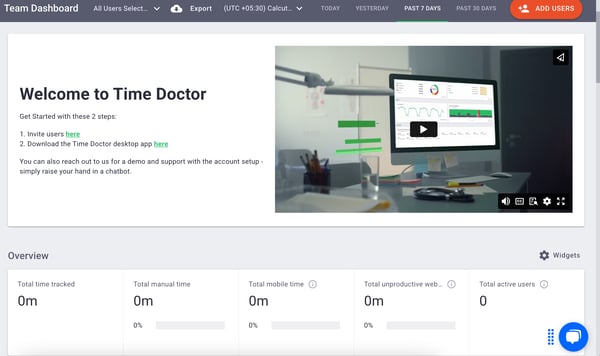
Another thing to mention is how smoothly the app and website tracking runs automatically in the background, categorizing usage as productive, unproductive, or neutral based on configurable rules. This gives HR and operations leaders a cleaner signal on where focus actually lands throughout the workday. G2 Data rates Time Doctor at 91% for web and application usage monitoring.
Integration with payroll and project management tools adds billing accuracy to the equation. Time Doctor connects with tools like Jira, Asana, Gusto, and QuickBooks, routing time data directly into payroll and invoicing workflows. Reviewers, managing contractors, and remote hourly staff cited this as one of the biggest time-savers on the platform.
With a 92% satisfaction rating, Time Doctor’s setup is genuinely low-friction. The desktop app launches automatically on login, eliminating the “forgot to start tracking” problem that plagues manual time logging. Several HR managers noted that employee onboarding took minutes, not days, when rolling out monitoring across distributed teams.
That said, a few G2 reviewers note that when employees are reading documents, watching training videos, or on extended calls without mouse activity, Time Doctor can flag them as idle, creating inaccurate productivity scores and occasionally uncomfortable conversations. However, reviewers also mention that configuring custom activity rules for different role types is highly beneficial in such cases.
Some reviewers flag that the reporting dashboard has a learning curve, particularly for new admins exploring filters, multi-week exports, or integration-specific reports. The core day-to-day views are straightforward, but unlocking the full depth of Time Doctor’s analytics requires some initial setup time, which the platform’s documentation and support team are generally well equipped to help with.
Overall, Time Doctor holds a 4.4-star average rating on G2, reflecting strong satisfaction among operations managers and HR leaders who manage remote and distributed teams.
What I like about Time Doctor:
- I loved the three-fold time-tracking process, which gives every peer greater transparency into each other’s work queues and progress.
- I think the location-tracking and GPS-monitoring features are a plus, as they help you keep your on-field employees connected and track their activities.
What do G2 users like about Time Doctor:
“With Time Doctor, I will be able to view the productivity of my team and will have proof if they commit any mistakes, plus it will also show the overall work hours of each individual separately. I really like this software. It’s clean and to the point. Has all the features I use and need.”
What I dislike about Time Doctor:
- G2 reviewers note that idle time detection can misread low-mouse-activity work, such as reading or video training, as unproductive, skewing scores for roles that don’t involve constant keyboard input. Though custom productivity rules help offset this.
- The reporting dashboard takes time to fully configure, especially for multi-team setups or Jira integrations, though once set up, it runs cleanly and the support team is responsive when setup questions arise.
What do G2 users dislike about Time Doctor:
“One area that could be improved is making the reporting and dashboard features more customizable and easier to navigate, especially when managing a larger team. Having more flexible views and quicker access to key insights would help me monitor multiple VAs more efficiently. Additionally, improving sync stability and reducing occasional tracking issues would further enhance the overall user experience.”
– Time Doctor review, Dan Ryan S.
3. We360.ai: Best for live activity and web usage monitoring
We360.ai is the kind of tool that makes you wonder why you ever relied on manual timesheets. It tracks everything from app usage and URL activity to attendance and screenshots, all from a single centralized dashboard.
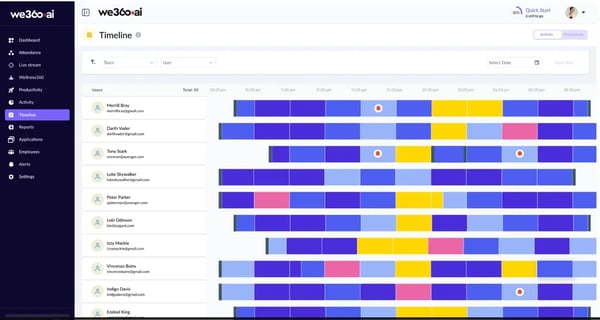
Real-time activity monitoring is where We360.ai earns its position. The timeline view gives a color-coded, minute-by-minute breakdown of what each employee was doing throughout the day, which apps were open, which URLs were visited, and how long each activity lasted. There’s no guesswork involved, and no waiting for end-of-day reports to know where time is going. G2 Data shows We360.ai scoring 98% for web and application usage monitoring.
Screenshot monitoring runs alongside the activity timeline, capturing periodic screen grabs that HR and operations managers can review for quality checks, compliance validation, or performance conversations. G2 Data rates We360.ai at 98% for screenshot-based reporting, and reviewers describe it as one of the least intrusive implementations of this feature, with clear timestamps, blurred sensitive data options, and contextual app and URL data attached to each capture.
I was really impressed by how productivity analytics goes beyond raw activity counts. The Scorecard feature aggregates each employee’s average working time, active time, productive time, and idle time into a monthly performance summary that employees can view themselves, turning monitoring data into a self-improvement tool rather than just a management lever. G2 Data rates We360.ai at 100% for productivity intelligence, the highest score in the category.
Attendance and punch-in management are handled natively through the MyZen companion app, which employees use to clock in, review their own productivity data, and submit manual time entries with supporting evidence. I think for HR teams managing large headcounts across shifts, this closes the loop between monitoring data and attendance records without requiring a separate HRMS integration.
The Intelligence module automatically maps and categorizes all URLs and applications as productive, unproductive, or neutral. This configuration runs in the background and feeds directly into productivity reports without requiring manual tagging. Reviewers from operations-heavy roles highlighted this as the feature that made productivity analysis feel automatic rather than administrative.
Admin controls are robust and granular. Role-based access, team-level permission tracking, audit logs, and IP address controls enable IT administrators to configure monitoring policies precisely, particularly valuable for organizations managing compliance requirements or multi-site operations. I noticed many reviewers at enterprise-scale organizations praising the depth of the available administrative configuration.
Nonetheless, some users note a delay between real-time activity and the appearance of that data on the admin dashboard, which means live decision-making based on current data isn’t always possible. For teams that review activity in end-of-day or scheduled report cycles, this isn’t an issue; for those who need instant visibility, it’s worth factoring in. We360.ai’s support team is noted as responsive in addressing sync-related queries.
And the active time calculation, which currently relies primarily on mouse movement and keystrokes, occasionally underrepresents work that involves reading, reviewing documents, or scrolling, creating activity scores that don’t always reflect the full picture for research-heavy or analytical roles. Reviewers, however, note that relying on detailed productivity reports rather than the activity percentage alone provides a more accurate view, and We360.ai is actively working on threshold customization to address this.
Overall, We360.ai’s 4.8/5 average rating on G2 makes it worth considering for HR and operations teams that want deep, real-time workforce visibility without a steep learning curve or a cluttered interface; it’s the most consistently praised option in this category.
What I like about We360.ai:
- I like how We360 offers clear, actionable insights into employee productivity to ensure your team meets preset targets.
- I absolutely loved the features like screenshot monitoring and live streaming, which help you manage employee profiles without being too intrusive.
What G2 users like about We360.ai:
“We360.ai provides detailed workforce visibility through its activity tracking, attendance monitoring, timeline reports, and dynamic reporting features. The dashboard is easy to navigate, and the reporting capabilities help us analyze employee productivity, working hours, and attendance efficiently. The support team is also highly responsive and provides excellent guidance during onboarding and product adoption. We also had a meeting with We360.ai and Deckzi Solutions Private Limited.”
–We360.ai review, Jerina S.
What I dislike about We360.ai:
- G2 reviewers note that data syncing can lag, meaning the admin dashboard doesn’t always reflect activity in real time. Yet, this is a minor trade-off for teams that work with scheduled reports rather than live monitoring.
- Active time scoring is weighted toward mouse and keyboard input, which can undercount productivity for reading- or analysis-heavy roles; reviewers recommend pairing activity scores with the detailed productivity reports for a more complete picture.
What G2 users dislike about We360.ai:
“The software has a bit of a learning curve, and it also takes some time to sync the data. Because of that, I usually wait until the end of the day to check the data, although everything else is fine.”
– We360.ai review, Jagannath R.
Looking to turn employee visibility into employee voice? Explore the best employee advocacy software to build a culture where your team promotes the brand from the inside out.
4. Time Champ: Best for productivity and workflow automation
When I used Time Champ, I verified that its simple, user-friendly interface and seamless productivity management services can boost any organization’s throughput.
Based on my analysis, the automated timesheet engine is one of the most practically useful features on the platform. Time Champ records work hours, active and idle time, and task progress automatically — no manual clock-ins, no end-of-day logging, no reconciliation effort. G2 Data rates Time Champ at 100% for hours tracking, and many reviewers also cited the automated timesheets as a significant reduction in administrative overhead, particularly for operations and HR teams managing headcount across multiple departments.
Real-time dashboards give managers instant visibility into team performance without needing to dig through reports. G2 Data scores Time Champ at 96% for web and application monitoring and 99% for productivity intelligence. The graphical interface breaks down productivity trends, app usage, active versus idle time, and task status in an easy-to-read, shareable format for stakeholders.
I especially liked how attendance management is built directly into the platform, covering punch-in and punch-out tracking, shift scheduling, and leave management from a single interface. For growing businesses that haven’t yet invested in a standalone HRMS, this consolidation eliminates a genuine operational gap by keeping attendance, activity, and performance data in a single system.
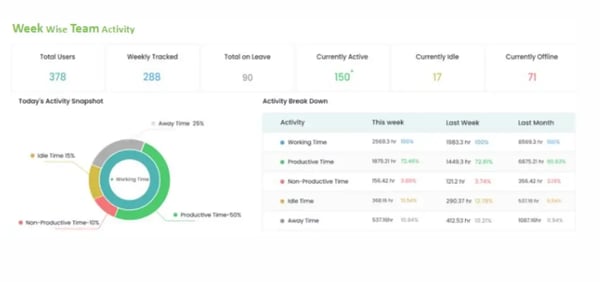
On the integration front, I set up seamless application programming interface (API) integrations with other project management extensions like Trello and Slack. Receiving a dropdown of time duration on projects was also a huge plus for me. This makes Time Champ’s monitoring data actionable within existing workflows rather than sitting in a siloed dashboard.
Workflow automation is where Time Champ lives up to its positioning. Automated reminders, task assignment notifications, and scheduled report delivery reduce the manual follow-up workload for team leads and project managers, creating a self-running oversight loop that keeps operations moving without constant intervention.
Likewise, URL and application monitoring runs automatically, categorizing websites and apps as productive or unproductive based on configurable policies. Reviewers noted how the real-time pop-up alerts for unproductive URLs helped employees self-correct without requiring direct manager intervention.
That said, some G2 reviewers have mentioned that the platform’s extensive toolkit can feel detailed at first, especially when exploring multiple dashboards and features. However, the inclusion of tooltips, tutorials, and guided onboarding makes it easy for users to get comfortable quickly, making Time Champ ideal for teams that value depth and customization once they’ve settled into the system.
The tool’s design emphasizes real-time online tracking accuracy, and while offline activity isn’t captured instantly, it syncs once reconnected, a smart trade-off that ensures data reliability and precision. This makes it a great fit for remote and hybrid environments, where consistent connectivity supports accurate reporting.
Time Champ has a 4.8/5 average rating on G2. With its light yet functional mobile app, Time Champ offers quick access to essential insights while keeping the interface clean and distraction-free, perfectly suited for managers and team leads who want actionable visibility on the go.
What I like about Time Champ:
- I liked the website-tracking feature and the seamless pop-up on the main employee-monitoring screen.
- I loved the presence of graphical reports, which made it easy to analyze employee data.
What G2 users like about Time Champ:
“Time Champ offers a complete package of features, such as automated time tracking and productivity analysis, all in one place. Real-time activity and screen monitoring provide transparency with remote teams without being intrusive. Additionally, the user-friendly dashboards make it easy to visualize performance and manage projects”
–Time Champ review, Balaji P.
What I dislike about Time Champ
- G2 reviewers note that the platform’s depth creates an initial learning curve, particularly when configuring advanced reports and workforce insights. But onboarding resources and tooltips make the ramp-up manageable for most teams.
- A few reviewers noted occasional lags or display discrepancies in activity dashboards, though these are quickly resolved with a refresh, a small trade-off for a system that’s continuously optimized to deliver faster, more reliable reporting over time.
What G2 users dislike about Time Champ:
“While the interface is packed with features that provide great insights, it can feel a bit cluttered and overwhelming for new users. Navigating through the extensive reporting options and setting up the initial configurations may require some time to master.”
– Time Champ review, Achyuth T.
Monitoring employee activity is only half the equation. Pair it with the best security compliance software to ensure your data governance and regulatory obligations stay airtight.
5. DeskTime: Best for project tracking and scheduling
DeskTime sits at the intersection of time tracking and project management. It’s the tool for teams that need to know not just how many hours were worked, but exactly which projects, tasks, and clients those hours went to.
What differentiated it most for me was the project time-tracking module. I could allocate tracked hours directly to specific projects and tasks, assign billable rates per employee or project, and calculate ROI against budget in real time. For managers overseeing multiple client engagements or juggling new-hire onboarding budgets, this level of project visibility removes much of the manual reconciliation that typically occurs outside the monitoring tool. G2 Data rates DeskTime at 91% for project-based productivity tracking.
Shift scheduling and absence management extend DeskTime beyond pure monitoring into workforce planning. I could set schedules, track shifts against actual logged hours, and manage leave requests, all from the same platform, without switching to a separate HR tool. For growing teams that don’t yet have a dedicated HRMS, this consolidation is a genuine operational advantage.
DeskTime was perfect for allocating hours to specific tasks, ensuring I stayed on top of deadlines and budgets for new hires. I can assign spending to projects, get updates from the revenue team, and perform real-time ROI calculations. Completing projects on time has never been easier for me.
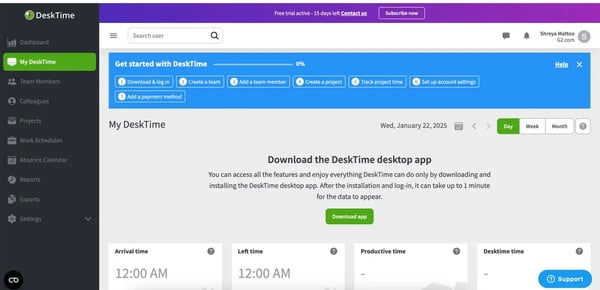
The automated time-tracking feature also ensured I logged my work and my team’s work accurately, leading to a tangible increase in efficiency. The feature also captures app usage, URL activity, and active versus idle time without requiring manual start or stop of timers.
Payroll and billing integrations streamline the pay cycle for both employees and freelancers. DeskTime connects tracked billable hours directly to invoicing workflows, making it particularly well suited for agencies, consultancies, and businesses with variable workforce arrangements where accurate time-to-invoice reporting matters.
Screenshot capture provides visual verification of activity during tracked sessions. DeskTime takes periodic screenshots that administrators can review alongside the URL and app usage data, adding a layer of contextual accountability that raw activity scores alone can’t provide. G2 Data scores DeskTime at 92% for screenshot-based reporting.
That said, some G2 reviewers note that DeskTime’s detailed reporting tools take time to master, especially for new users fine-tuning their dashboards. This learning curve, however, reflects the tool’s depth and flexibility, making it ideal for teams that want customizable analytics and advanced project tracking rather than basic summaries.
DeskTime’s desktop app requires a manual launch by default, giving employees control over when tracking begins. Some reviewers found this less convenient than a fully automatic startup, particularly in large deployments where inconsistent launch habits can create gaps in attendance data. The option to configure automatic startup is available, and teams that enable it report more consistent data capture across the board.
DeskTime holds a 4.5/5 average rating on G2. It is well-suited for teams that want structured control over time management and productivity, offering the right balance between monitoring accuracy and user flexibility.
What I like about DeskTime:
- I liked the easy sync between timesheets and the main dashboard, and the grouping of users to manage team-specific metrics.
- The level of configuration was perfect for me; I could easily clock in, check app URLs and browsing activities, and set performance discussions.
What G2 users like about DeskTime:
“I like the ease of use and that you can add integrations, such as Google Calendar, to synchronize your meetings with the time tracker at work. It also has online support to solve any kind of problem. In terms of performance, it works very well and, regarding the price, it offers various types of subscriptions depending on the budget you have available.”
–DeskTime review, César M.
What I dislike about DeskTime:
- G2 reviewers note that initial workstation-level configuration takes time, particularly for teams with varied role types that need custom productivity categories. Yet, the depth of customization available is precisely what makes the data useful once it’s set up.
- The default manual app launch can create attendance data gaps in larger deployments; enabling automatic startup resolves this, but it requires an additional configuration step that isn’t prominently surfaced during onboarding.
What G2 users dislike about DeskTime:
“I sometimes have to manually update the categorization of websites as unproductive or productive. I would prefer if the software included AI features that automatically detect what is productive and what is not for the organization.”
– DeskTime review, Rakesh K.
6. Teramind: Best for insider threat detection and data security
Most employee monitoring tools tell you what employees are doing. Teramind tells you when what they’re doing becomes a risk, and that distinction makes it the tool built equally for IT security teams and HR leaders.
I was fascinated with Teramind’s services, which provide data loss protection, threat investigation and management, and network operationalization as part of the productivity stack. I felt right at home navigating them, knowing that data connections were secure and reliable at all times.
Also, it offers real-time activity monitoring, covering every dimension of employee behavior on a centralized dashboard, including app logins, web usage, file transfers, email activity, and live screen sessions, with granular rule-based controls that let administrators define exactly what triggers an alert. Rather than passively recording activity, Teramind actively interprets behavioral patterns and flags anomalies before they escalate. G2 Data scores Teramind at 92% for activity monitoring accuracy and 90% for social media and email activity tracking.
What stood out to me was its proactive approach to insider threat detection. The platform uses behavioral analytics to establish baseline activity patterns for each user and surface deviations, such as unusual login times, abnormal file access, and unexpected data transfers, in real time. For regulated industries like insurance, finance, and healthcare, where a single data breach carries compliance consequences, this proactive posture is difficult to replicate with a standard productivity monitoring tool.
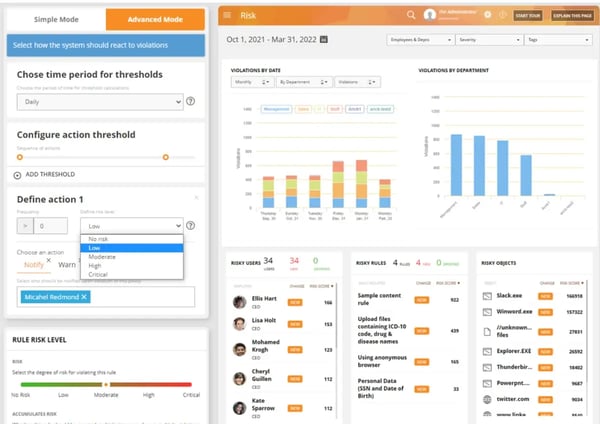
Another big win is the focus on data loss prevention. Teramind lets users monitor and control file transfers, block specific data exfiltration channels, encrypt sensitive files, and set up automatic response protocols when policy violations occur. Reviewers in IT coordinator and ERP consultant roles specifically called out the custom alert system for email, calls, and screen captures as the feature that provides genuine security coverage, not just visibility.
Remote system access and administration enable IT teams to manage, troubleshoot, and configure endpoints without being physically present or launching the app on each device anew. Reviewers in mid-to-large enterprise IT roles highlighted this as a meaningful time saver, particularly for distributed organizations managing endpoints across multiple office locations or cloud environments.
Screen recordings and screenshots provide a forensic-grade evidence trail for compliance audits and internal investigations. Unlike periodic screenshots, Teramind’s screen recording captures continuous session footage that can be reviewed at any timestamp, making it the tool of choice for teams that need documented proof of user activity for regulatory reporting or HR proceedings.
That said, Teramind’s Agent update frequency drew feedback from enterprise reviewers, who found the cadence more disruptive than necessary in stable environments. Teramind pushes updates to keep behavioral detection models and security rules current, but the option to schedule updates during off-hours reduces operational friction for teams sensitive to endpoint disruption.
The user interface presents a learning curve, particularly for non-technical users navigating the platform’s rule configuration, alert management, and behavioral analytics modules for the first time. Reviewers noted that the UI has improved in recent versions but still requires initial guidance for administrators unfamiliar with security-first platforms. Once the setup is complete, day-to-day use is straightforward; the complexity is front-loaded rather than ongoing.
Teramind holds a 4.6/5 average rating on G2. It remains a reliable, security-driven platform built for organizations that value visibility, precision, and control in their employee monitoring and data protection processes.
What I like about Teramind:
- I liked that I could set up timesheet integrations across employee accounts on public or hybrid cloud servers to bridge the communication gap.
- It was very convenient for me to remotely access and administer systems without launching the app anew on a different OS or hardware device.
What G2 users like about Teramind:
“I appreciate Teramind’s remote features and activity records. We have been able to resolve many tech issues for other employees online. The initial setup was also very user-friendly as long as the device had a decent internet connection speed.”
–Teramind review, Ren.
What I dislike about Teramind:
- G2 reviewers note the interface can feel complex for non-technical users, particularly during initial rule and alert configuration — though recent UI updates have improved navigation, and the learning curve is front-loaded rather than persistent.
- Agent update frequency can feel disruptive in stable enterprise environments; scheduling updates during off-hours is possible and significantly reduces the operational impact for teams managing large endpoint fleets.
What do G2 users dislike about Teramind:
“The agent updates happen too frequently. We prefer to update less often unless there’s a specific need to do so.”
– Teramind review, Brian C.
7. Insightful: Best for team performance tracking and project analytics
Insightful delivers enterprise-grade workforce analytics in an interface that doesn’t require a training manual to navigate.
With a 94% satisfaction rating on G2 for ease of use, Insightful offers a clean, logically organized, and easy-to-interpret reporting dashboard. Activity data, productivity metrics, app usage, and attendance details are all grouped intuitively, so you can move between team-level summaries and individual employee breakdowns without getting lost in nested menus. I came across many reviewers of all company sizes, from two-person operations to 10,000-employee enterprises, who cited the interface as the feature that made adoption frictionless.
I really liked how Insightful captures active and idle time, app usage, and website activity continuously, feeding the data into structured timesheets that sync to the dashboard in near real time. Reviewers managing remote and hybrid teams specifically noted that the automatic startup removes the biggest single point of failure in time tracking — employees forgetting to log in. G2 Data scores Insightful at 94% for web and application usage monitoring.
Project-level time tracking allows managers to see not just how many hours were worked, but exactly which projects, clients, and tasks those hours went to. For operations managers overseeing distributed teams across multiple client engagements, this project accounting capability turns Insightful from a monitoring tool into a resource planning asset. G2 Data scores Insightful at 90% for project-based productivity tracking.
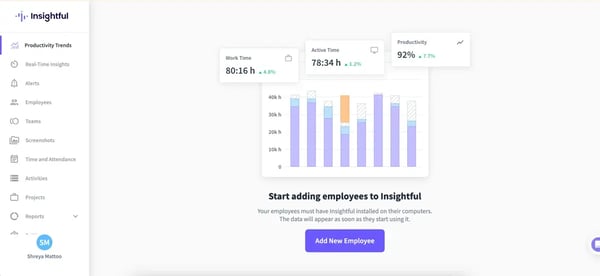
App and website categorization runs automatically, sorting every URL and application visited into productive, unproductive, or neutral buckets based on configurable rules. The auto-labeling accuracy drew consistent praise from reviewers, reducing the manual tagging effort that makes productivity categorization impractical at scale.
G2 Data rates Insightful at 95% for screenshot accuracy. This module is particularly praised by reviewers in IT and compliance roles for how cleanly it integrates with the broader activity monitoring view, enabling activity verification without requiring a separate investigation workflow.
Pricing flexibility is a practical differentiator. Insightful charges per actual user, making it accessible to small teams and freelancer-managed operations that need professional-grade monitoring without paying for unused capacity. Multiple reviewers cited the cost-to-feature ratio as a primary reason for switching from Hubstaff or other tools.
On the flip side, reporting customization has room to grow. Reviewers in data-heavy roles noted that while the built-in reports cover day-to-day needs well, building cross-team comparisons across custom date ranges or exporting granular app usage data quickly runs into limitations. The core dashboard is strong; the power-user reporting layer is where the platform still has ground to cover.
Likewise, idle-time detection during meetings and calls occasionally causes accuracy issues. Reviewers note that configuring break windows and communicating this behavior up front to employees significantly reduces confusion.
With a 4.6/5 average rating on G2 and a 92% ease-of-setup score, Insightful offers a strong combination of usability and analytical depth for teams that want monitoring without operational complexity.
What I like about Insightful:
- I loved the real-time workforce analytics that delved into performance metrics for each individual employee.
- Whenever I encountered a technical issue with a module, the customer service team was prompt and proactive, resolving it quickly.
What G2 users like about Insightful:
“Setup was easy, and syncing with Microsoft Entra was also very easy. UI is intuitive and smooth, not too cluttered but not too hard to find what I needed for setup. Above all, I have been very happy with their support team, who have been quick to respond and address my questions.”
– Insightful review, Stefan S.
What I dislike about Insightful:
- G2 reviewers note that reporting customization hits its limits for advanced use cases — cross-team comparisons and granular app usage exports aren’t as flexible as the core dashboard suggests, though everyday reporting needs are well covered.
- Idle detection during meetings and calls can undercount active work time for employees in communication-heavy roles; pairing activity scores with manual break configurations addresses most of this gap.
What do G2 users dislike about Insightful:
“So far, I haven’t found any downsides to Insightful. My only recommendation is to make it clearer in the desktop app that computer tracking stops when the Stop button for logging hours is clicked. I think this small change would give users more confidence that their computer is secure and that privacy is maintained when they’re not working.”
– Insightful review, Jenna C.
8. ActivTrak: Best for behavioral insights and productivity analysis
Instead of treating monitoring as surveillance, ActivTrak frames it as workforce intelligence, using behavioral patterns to help organizations understand how work actually gets done.
The Team Pulse dashboard is ActivTrak’s most distinctive feature. It delivers a continuously refreshing, real-time view of productivity metrics across all active employees without requiring managers to dig through reports or pull manual exports. Reviewers in IT and operations roles called it the fastest way to get a current read on team productivity without interrupting anyone’s flow. G2 Data rates ActivTrak at 90% for web and application usage monitoring.
Behavioral analytics go beyond raw activity counts to surface work-pattern insights, such as attention spans, focus time, multitasking frequency, and productivity trend lines across individuals and teams. Weekly summary emails with behavioral trend data allow managers to spot anomalies, like unexplained drops in activity, and investigate proactively rather than reactively. This outcome-oriented approach to monitoring is what distinguishes ActivTrak from tools that simply log what employees do.
App and website tracking runs automatically through an invisible background agent that captures usage data without impacting device performance. You can categorize every application and website as productive, unproductive, or neutral, and build custom alerts when employees access prohibited or off-task content. G2 Data scores ActivTrak at 85% for screenshot monitoring and 80% for web blocking, reflecting a platform designed for insight-driven oversight rather than blanket restriction.
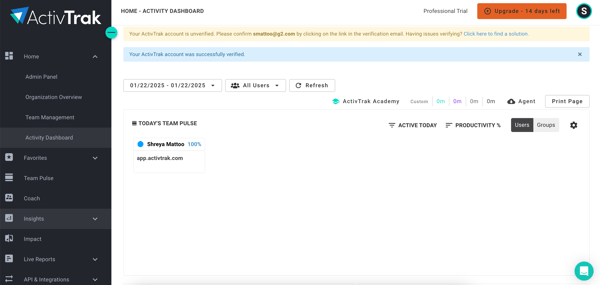
AI-powered productivity insights represent ActivTrak’s clearest move toward intelligent monitoring. The platform analyzes behavioral data to surface recommendations on workload distribution, focus time, and burnout risk indicators. Reviewers noted the AI alarm templates for flagging unusual usage patterns as a practical time-saver for IT coordinators managing large user populations.
Custom dashboards and reporting allow administrators to build monitoring views tailored to their team structure and oversight priorities. User grouping lets managers create department- or role-specific dashboards, track metrics relevant to each team’s workflow, and share weekly summaries without exposing organization-wide data to individual managers. G2 rates ActivTrak at 78% for productivity intelligence, reflecting its behavioral analytics depth rather than raw feature breadth.
Cross-platform deployment covers Windows and macOS, with full agent functionality, and provides browser-based access for Linux users. The invisible agent installs cleanly across endpoints and runs without affecting device performance.
While some G2 reviewers noted that ActivTrak doesn’t include a one-click website blocking option, this design choice is intentional. It supports policy-driven oversight rather than blanket restrictions, helping companies foster a culture of accountability and trust instead of micromanagement. This makes ActivTrak ideal for organizations that prioritize employee autonomy while maintaining visibility into productivity.
Site categorization accuracy occasionally misfires even after manual configuration, with some reviewers noting that recategorized URLs revert or don’t propagate consistently across the dashboard. The auto-categorization engine handles most common apps and websites accurately; edge cases tend to involve niche or internal tools that the model hasn’t encountered frequently enough to classify reliably.
Overall, with a 4.3/5 average rating on G2, ActivTrak is one of the most reliable tools for organizations seeking to understand and optimize how their teams work. Its blend of AI-driven behavioral insights, customizable reports, and intuitive dashboards makes it an excellent fit for leaders who want to improve productivity without micromanaging.
What I like about ActivTrak
- I love that ActivTrack helped manage collaborations with my remote or in-person peers and promote employee well-being.
- I created a weekly dashboard to wrap up the week’s activities and plan the next week.
What G2 users like about ActivTrak
“I like how ActivTrak gives visibility into different types of behaviors, allowing me to mentor those specific things. As a manager, I appreciate the weekly email that provides trends, helping me monitor my team’s activity, especially looking for unexpected changes. When there is a drop in activity and I’m not aware of anyone being out, it prompts me to check further. Additionally, from what I’ve seen, the setup is pretty straightforward, and it seems fairly easy to integrate if updates are needed.”
– ActivTrak review, Trent C.
What I dislike about ActivTrak:
- G2 reviewers note that website blocking requires a manual, multi-step process rather than a one-click option from the activity feed — a friction point for IT teams that need fast content control, though the alert-based visibility layer still flags off-task browsing in the meantime.
- URL categorization can misfire on niche or internal tools even after manual correction; relying on ActivTrak’s support team to resolve persistent miscategorizations adds a resolution step that shouldn’t be necessary at this tier of product.
What G2 users dislike about ActivTrak:
“ActivTrak adds a user each time our IT admin sets up a new computer for a new user. So in this scenario, the IT admin counts as an additional user when it isn’t the case.”
– ActivTrak review, Ray B.
Frequently asked questions (FAQs) about the best employee monitoring software
Have more questions? Here are the answers:
Q. Which employee monitoring software avoids constant false positives and excessive screenshot capture rates?
Hubstaff and Time Doctor offer the most configurable screenshot and activity detection settings, letting administrators adjust capture frequency and set custom idle thresholds to reduce inaccurate flagging. We360.ai and Insightful are also good options — both use app- and URL-based activity signals rather than relying solely on mouse and keyboard input, which reduces false idle alerts for roles that involve reading, reviewing, or call-based work.
Q. Which employee monitoring platforms with screenshot and app usage tracking do teams readily adopt?
We360.ai and Insightful consistently receive the highest ease-of-use ratings on G2, with reviewers citing intuitive interfaces and low-friction onboarding as the primary reasons for smooth team-wide adoption. Time Champ and DeskTime also perform well here, with reviewers noting that the employee-facing experience is unobtrusive enough to minimize resistance during rollout.
Q. Which employee monitoring software integrates directly with payroll systems for seamless hour reporting?
Hubstaff offers the most comprehensive payroll integration suite, connecting directly with platforms like Gusto, QuickBooks, and Bitwage to route tracked hours into automated pay cycles. Time Doctor also integrates with payroll tools, though reviewers note that compatibility with Gusto can be inconsistent. DeskTime handles billable rate tracking and invoice generation natively, making it a strong option for teams that bill clients rather than run traditional payroll.
Q. Which employee monitoring solutions offer automatic time tracking and screenshot capabilities for distributed workforces?
Hubstaff, Time Doctor, We360.ai, Insightful, and Time Champ offer fully automatic time tracking alongside configurable screenshot capture. For distributed teams specifically, We360.ai’s centralized admin dashboard and time zone-aware reporting make it a strong all-around option, while Insightful’s flexible pricing model makes it accessible for geographically distributed teams of varying sizes.
Q. What is the best employee monitoring software for remote teams needing real-time visibility without privacy concerns?
ActivTrak and Insightful are the most frequently cited options for remote teams that want visibility without an invasive monitoring posture. ActivTrak’s behavioral analytics approach focuses on work patterns rather than keystroke-level surveillance, while Insightful’s transparent dashboard builds trust rather than eroding it. We360.ai’s Scorecard feature, which gives employees visibility into their own productivity metrics, also supports this dynamic effectively.
Q. Which time tracking and employee monitoring platforms effectively reduce payroll disputes and billing errors?
Hubstaff and DeskTime are the best options here. Hubstaff’s automated timesheets with screenshot evidence create a verifiable record of hours worked that resolves disputes before they escalate, while DeskTime’s project-level billable rate tracking ensures client invoices are backed by accurate, time-stamped data. Time Doctor’s three-tier reporting structure (individual, team, and company) also gives managers the documentation needed to address payroll discrepancies with specifics rather than approximations.
Q. What is the most trusted employee monitoring software for operations managers at SaaS firms based on user reviews?
ActivTrak and Insightful rank highest among operations managers in software and SaaS environments on G2. ActivTrak’s behavioral analytics and Team Pulse dashboard suit fast-moving ops teams that need live visibility into distributed workforces, while Insightful’s project-level tracking and clean reporting interface align well with the outcome-oriented management style common in SaaS operations.
Q. What is the highest-rated employee monitoring software for operations teams managing payroll at enterprise scale?
Hubstaff is the most reviewed and highest-scoring tool in this category on G2, making it the most validated option for enterprise-scale payroll operations. Its native payroll integrations, GPS tracking, and automated timesheet engine make it the most complete option for large teams. We360.ai is the most positively reviewed tool among users who have rated it, making it a strong contender for organizations prioritizing satisfaction alongside scale.
Q. What are the most reliable employee monitoring platforms, based on user reviews, for sustainable adoption and retention?
We360.ai, Time Champ, and Insightful score highest on the metrics most predictive of long-term adoption. Hubstaff’s large and sustained review base signals the strongest track record of continued use at scale, while We360.ai and Time Champ lead on satisfaction among teams that have fully embedded the tools into their daily workflows.
Q. Which employee monitoring tools are specifically designed for managing hybrid teams across multiple time zones?
Insightful and We360.ai are the best options for hybrid, multi-timezone teams. Insightful’s time zone-aware reporting and shift management features make it easy to track attendance and productivity across geographies. We360.ai’s mobile punch-in capability through the MyZen app extends monitoring to employees who aren’t desk-bound, while its centralized admin dashboard aggregates data across locations in a single view. Hubstaff’s GPS and location tracking add field-team visibility that most tools on this list don’t offer.
Monitor smarter, manage less
The tools on this list cover a wide range of use cases, but they share a common thread — the organizations that get the most out of employee monitoring are the ones that deploy it with a clear purpose and communicate that purpose to their teams. The right platform is less about features and more about fit.
Start by getting specific about the problem you’re actually solving. Once you know the core use case, evaluate how much transparency you plan to offer employees about what’s being tracked and why. Platforms that give employees access to their own data consistently show higher adoption rates and lower resistance than those that don’t.
The broader trend worth paying attention to is the shift from activity-based monitoring toward outcome-based workforce intelligence, including behavioral patterns, burnout indicators, and productivity trend lines. As hybrid work continues to redefine how output is measured, the platforms that help organizations move from “is my team online?” to “is my team effective?” will be the ones worth building around.
Finally, be honest about your team’s administrative bandwidth. A platform with deep configuration options delivers better data — but only if someone has the time and technical comfort to set it up correctly.
Surpass traditional employee standards and build a people-first strategy with performance management systems to ensure your employee productivity never drops.