

After literally losing count of the hours I’ve spent digging through meeting notes, trying to find a decision, confirm an action item, and remember who owned the next step, I set out to find the best AI meeting assistants.
While most tools can record conversations and generate transcripts (that’s table stakes, right?), the real value comes from how well they turn meetings into clear summaries, actionable next steps, and information that’s easy to revisit later.
I evaluated each tool on transcription quality, summary accuracy, action item extraction, integrations, ease of use, and overall meeting experience. I also cross-referenced verified G2 reviews, feature ratings, and satisfaction scores to understand where each tool performs best and what tradeoffs buyers should consider.
My top picks for 2026: Zoom Workplace, Fathom, Webex Suite, Krisp, and Otter.ai. Whether you’re a sales rep, project manager, or part of an enterprise team making a final call, there’s a fit on this list for how you work.
5 best AI meeting assistants for 2026: My top picks
- Zoom Workplace: Best for hybrid and enterprise meetings
Combines meeting summaries, action items, and workflow automation in one platform through its built-in AI Companion. ($13.33/month) - Fathom: Best for free AI meeting assistant, unlimited recording, and transcripts
Delivers instant call summaries with role-based templates and real-time meeting highlights on a generous free plan. ($15/month) - Webex Suite: Best for enterprise-grade AI meeting capture with unified calling
Supports real-time transcription, hands-free voice commands, and multilingual meeting capture across 100+ languages. ($12/user/month) - Krisp: Best for bot-free meeting capture with noise cancellation
Eliminates background noise while providing AI-generated meeting notes, summaries, and transcripts without requiring a meeting bot to join calls. ($8/user/month) - Otter.ai: Best for real-time transcription with auto-generated action items
Provides live transcription, searchable meeting notes, speaker identification, and automated action item extraction. ($8.33/user/month)
*These best AI meeting assistant platforms are top-rated in their category, according to the latest G2 Summer 2026 Grid Report. I’ve added their standout features and pricing information for an easy comparison.
5 best AI meeting assistants I recommend
When I think about an AI meeting assistant, I see it as a co-pilot that sits in every meeting with me. Instead of scrambling to capture who said what, these tools record, transcribe, and surface the key details I actually need: decisions, action items, and follow-ups. In other words, they take care of the busywork so I can stay focused on the conversation.
The category is evolving as organizations embrace hybrid work and AI-powered productivity tools. According to Precedence Research, the AI meeting assistants market is projected to grow from $1.42 billion in 2026 to $6.28 billion by 2035, driven by increasing demand for automated note-taking, meeting intelligence, and generative AI capabilities.
As I evaluated the top-rated products, I paid close attention to how well they went beyond basic transcription. I looked at features such as real-time summaries, speaker identification, action item extraction, searchable meeting records, integrations, and overall usability to understand which tools delivered the most value after a meeting ends.
After reviewing user feedback, digging into product capabilities, and considering how businesses of different sizes use them, I identified five AI meeting assistants that truly stand out.
How did I find and evaluate the best AI meeting assistants?
To build this list, I started with G2’s Summer Grid® Report to create a shortlist of the top AI meeting assistant apps based on verified user reviews and market presence. This helped me identify both established category leaders and emerging solutions that consistently perform well for sales, project management, and enterprise collaboration use cases.
Next, I analyzed hundreds of verified G2 reviews to understand how these platforms perform in real-world environments. I focused on the factors buyers care about most, including transcription accuracy, summary quality, action-item detection, ease of setup, integrations with existing workflows, and the overall meeting experience. I also looked for recurring themes in user feedback to identify where products consistently excelled or fell short.
For Zoom Workplace and Fathom, I tested both platforms firsthand and drew on direct experience to inform my observations. For Webex Suite, Krisp, and Otter.ai, I validated my findings using G2 review data, feature satisfaction scores, product documentation, and AI-assisted review analysis. To provide additional context, I also spoke with fellow G2’ers who work in sales operations, project management, and enterprise IT to better understand real-world implementation experiences and day-to-day platform performance.
All product screenshots featured in this article come from official vendor G2 pages and publicly available materials.
What makes the best AI meeting assistants worth it: My criteria
After reviewing G2 Data and analyzing the features that consistently matter most in meeting intelligence software, several evaluation criteria stood out. These were the primary factors I used to assess the best AI meeting assistants:
- Accuracy and comprehension: I didn’t just want word-for-word transcripts. I wanted tools that could distinguish between casual chatter and actual decisions, reliably capture multiple speakers, and hold up under messy real-world audio conditions.
- Summary quality: A transcript is only step one. The best assistants generate concise, structured summaries with clear sections for key takeaways, decisions made, and open questions. If I still had to dig through raw text to find what mattered, it didn’t make the cut.
- Action item detection: I looked for tools that automatically identify tasks, owners, and deadlines directly from the conversation, which is one of the highest-impact features for reducing post-meeting follow-up time.
- Search and recall: I evaluated how a tool could quickly surface past discussions. The best tools let users search across meetings by keyword, speaker, or topic and return the exact moment in context, not just a line in a transcript.
- Integrations with workflows: Notes are useless if they live in a silo. I prioritized assistants that connect with calendars, CRMs, Slack, project management apps, and make exporting action items frictionless.
- Real-time performance: AI meeting assistants should perform consistently in real-time conversations, not just under ideal conditions. Evaluation included how effectively each tool handled interruptions, overlapping dialogue, multiple speakers, and varied accents.
- Security and compliance: Because meetings often contain sensitive information, strong security practices are critical. Particular attention was given to data storage policies, encryption standards, and compliance certifications such as SOC 2, GDPR, and HIPAA where applicable.
- Ease of use and adoption: Even the smartest AI assistant is useless if no one on my team wants to use it. I looked for clean UX, minimal setup, and intuitive workflows that don’t disrupt how teams already run meetings.
The list below contains genuine user reviews from the AI meeting assistants category. To be included in this category, a solution must:
- Create meeting summaries using AI and NLP
- Automate transcription of meetings
- Allow users to search, edit, and highlight meeting moments
- Outline action items and assign responsibilities to specific participants
- Automatically record meeting audio or video and make these recordings shareable or private
- Integrate with productivity tools like calendars, email, business instant messaging tools, project management software, and CRM systems
*This data was pulled from G2 in 2026. Some reviews may have been edited for clarity.
1. Zoom Workplace: Best for hybrid and enterprise meetings
When it comes to video collaboration, Zoom Workplace has long been the go-to platform for many teams, including mine. So using its AI Companion inside Zoom Workplace feels less like learning something new and more like unlocking a smarter version of a familiar tool.
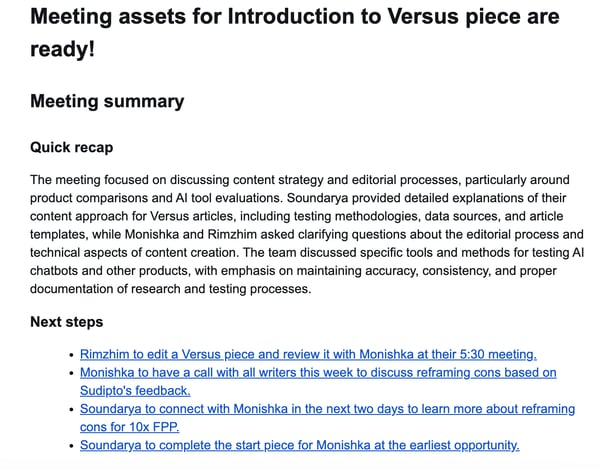
Once enabled, the AI Companion automatically generates meeting summaries that include a quick recap and next steps, list the action items for each individual, and are followed by a detailed transcript. G2 Data scores both automated note-taking and smart summaries at 92%, both among the highest in the category. Having those action items clearly outlined makes it easy to follow through after a meeting without digging through notes or rewatching recordings, with summaries shared automatically to email or Slack the moment a call closes.
What impressed me most was how seamlessly it fits into my workflow. The AI Companion doesn’t just capture what’s said. It makes that information usable. During meetings, I can quickly check whether my name was mentioned or revisit decisions made without interrupting the discussion. Afterward, I can chat with the AI to prioritize tasks, summarize conversations, or draft follow-ups directly within Zoom. G2 Data scores voice recognition at 89%, and users in multilingual or fast-paced environments consistently highlighted transcription accuracy as a reason they stayed with the platform.
Calendar integration with Google Calendar and Outlook was a recurring theme across use cases ranging from sales to HR to project management. Reviewers frequently described the integration as frictionless, enabling automated meeting links, reminders, and call joining directly from calendar events.
The workflow automation feature lets teams create and run AI workflows entirely within Zoom, turning it not just into a meeting tool but also a workspace for day-to-day operations. Teams can set up templates to introduce new members, send reminders for recurring project updates, collect team feedback, and manage time-off requests, all powered by the AI Companion.
These automations are especially useful for project managers who need quick status reports, marketing teams coordinating campaign updates, or HR teams welcoming new hires and tracking requests. It’s a subtle but powerful shift, turning Zoom into a single place to meet, plan, and manage routine work.
G2 Data scores autonomous task execution at 82% and cross-system integration at 84%, and these automations are especially useful for project managers who need quick status reports, marketing teams coordinating campaign updates, or HR teams welcoming new hires.
Transcription and accessibility features also receive positive feedback. Users value the platform’s live transcription, translation capabilities, and voice recognition features, particularly when collaborating across locations and time zones. Combined with Zoom’s reliable audio and video quality, these tools help teams stay aligned even during complex discussions.
From what I saw in G2’s latest data, Zoom Workplace performs exceptionally well where it counts. It scores 93% for ease of use and 94% for ease of setup, with users across IT services, computer software, marketing, and higher education noting that the interface feels intuitive. That matches my own experience. Getting started with the AI Companion felt effortless, and its features blended naturally into my existing Zoom habits.
That said, some G2 reviewers noted that AI Companion’s summaries can occasionally capture side conversations or comments that aren’t directly relevant to meeting outcomes. While this may require light editing before sharing summaries more broadly, many users appreciate the level of detail because it helps preserve context that might otherwise be overlooked.
G2 reviewers also highlighted that the software sometimes struggles with name spellings or misses finer nuances during especially long conversations. Yet most reviewers (and I’d agree) see these as minor trade-offs for the depth and accuracy they provide, which continue to improve with each update.
Zoom Workplace currently holds a 4.5 out of 5 rating on G2. For organizations looking to combine AI meeting assistance with collaboration, scheduling, and communication tools in a single platform, it remains one of the best options in the category.
What I like about Zoom Workplace:
- The AI Companion’s ability to generate summaries, capture action items, and distribute them automatically, without any manual steps, is the feature reviewers returned to most consistently across industries and team sizes.
- The built-in transcription and translation features are a huge plus. They make it easy to collaborate across time zones and languages without missing context.
What G2 users like about Zoom Workplace:
“What I like best about Zoom Workplace is its ease of use and reliability. It makes communication and collaboration simple through video meetings, chat, screen sharing, and file sharing in one platform. The audio and video quality are good, and it helps teams stay connected and productive whether working remotely or from the office.”
– Zoom Workplace review, Mahek T.
What I dislike about Zoom Workplace:
- Some G2 reviewers noted that AI Companion’s summaries can occasionally include side conversations or tangential discussion points. While that may require minor edits before sharing summaries more broadly, many users appreciate the additional detail because it helps preserve context that might otherwise be missed.
- Reviewers also reported that the AI can occasionally misspell names or overlook subtle nuances in longer, more complex discussions. However, most users view these issues as minor tradeoffs given the platform’s overall transcription and summarization accuracy, particularly for everyday business meetings.
What G2 users dislike about Zoom Workplace:
“Zoom Workplace is definitely feature-rich, but the growing number of tools and settings can make the interface feel a bit overwhelming at times, especially for new users. I’ve also noticed that resource usage can be more noticeable during longer meetings. On top of that, some of the more advanced collaboration features are limited to higher-tier plans, which may not be ideal for smaller teams working with tighter budgets.”
– Zoom Workplace review, Sumisha J.
2. Fathom: Best for free AI meeting assistant, unlimited recording, and transcripts
Fathom is one of those tools that knows exactly who it’s built for. Reviewing G2 user feedback made that clear immediately — sales, customer success, product, and HR teams kept returning to the same theme: Fathom runs entirely in the background so they can stay present in the conversation.
What stands out most for me is how thoughtfully it organizes and enhances meetings in real time. Before each meeting, Fathom sends a quick reminder and lets me add it to the recording queue, so I never forget to capture an important conversation.
During meetings, I can highlight or capture specific moments in real time, like when a customer mentions a deal blocker or a product request, and Fathom bookmarks that section instantly. I can even add custom names to these highlights, like “customer blocker,” “testimonial,” or “notes to share with the team,” depending on what I need. It’s a small but incredibly practical feature, especially for people working with customers or prospects who need to quickly reference key parts of a conversation later.
What I love the most is that I get both the full transcript and summary, along with action items and responsible parties, after the call. I like that I can switch summary templates based on context, like sales calls, customer success reviews, project meetings, or interviews, which makes every summary feel tailored. G2 Data scores smart summaries at 97%, and the structured output — key takeaways, decisions, next steps, and assigned owners — was cited repeatedly as something reviewers share with clients and stakeholders with minimal editing.
The “Ask Fathom” feature is another standout. It lets me search or ask questions about what was discussed, so I can quickly find details like “What did the client say about pricing?” without rewatching the recording. Even if I want to, I can go to the specific timestamps without scrolling through the entire recording.
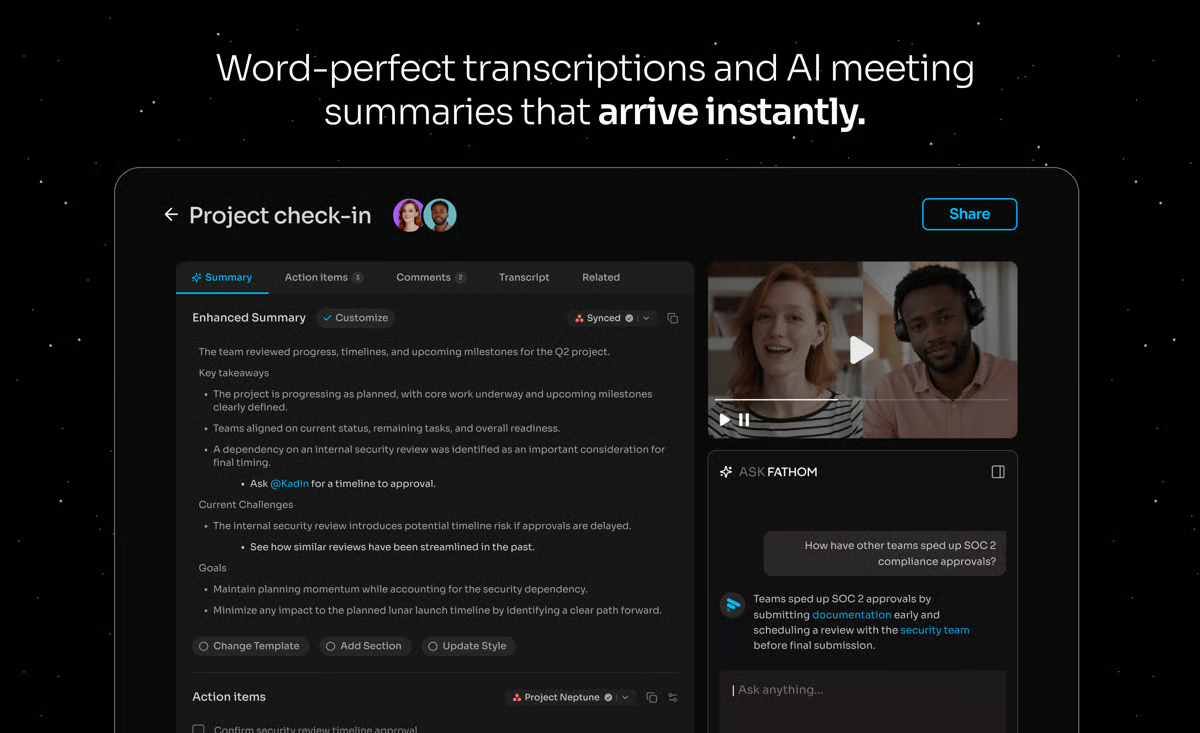
Fathom also integrates with tools like HubSpot and Salesforce, automatically pushing meeting summaries, highlights, and tasks into the appropriate contact or deal records. It also integrates with Slack, Asana, and Zapier, making it easy to share notes or automate follow-ups across workflows. Moreover, G2 Data scores cross-system integration at 91% and autonomous task execution at 91%.
And mind you, we get all of this with the free plan itself. In fact, Fathom has one of the most generous free plans among AI meeting assistants I’ve tried. It includes unlimited recordings and transcriptions, instant call summaries delivered to your inbox, the ability to create clips and playlists, and search across all your calls, plus premium features like advanced summaries, Ask Fathom, and action items for the first five calls of the month.
The G2 user reviews echo a similar sentiment. According to G2 Data, Fathom performs exceptionally well across nearly every metric. It scores 97% for ease of use and setup, and 98% for quality of support, numbers that match my own experience.
At the same time, G2 reviews highlight a few minor trade-offs worth noting. Like most AI note-takers, this one isn’t completely immune to occasional transcript slips, though they rarely affect overall comprehension. Its accuracy remains strong enough for capturing key themes and action items, making it reliable for everyday meeting documentation.
A handful of reviewers also mentioned that Fathom joins meetings as a visible bot participant, which can feel slightly intrusive on external client calls where the presence of a notetaker changes the dynamic. That said, Fathom has been rolling out a bot-free capture mode, and many reviewers have noted that this has already addressed concerns in their use cases.
These are just small concessions in what’s otherwise a reliable and well-designed experience. With a perfect 5-out-of-5 rating on G2, it’s clear I’m not the only one impressed. Users genuinely trust and enjoy it. So whether you’re in sales, customer success, marketing, or project management, or just have a lot of meetings, Fathom will make those meetings easier to manage and much more productive.
What I like about Fathom:
- I love how hands-free Fathom feels — it automatically records, transcribes, and delivers detailed summaries with action items right after every meeting.
- The flexibility to switch summary templates by context (sales, customer success, project management, interviews) makes note-taking far more useful and tailored.
What G2 users like about Fathom:
“What I find most valuable is the quality of the AI-generated summaries and action items. Instead of spending time taking notes, I can focus entirely on the conversation. After the meeting, I get a structured summary, key discussion points, follow-ups, and next steps that are easy to share with prospects, partners, and internal stakeholders.”
– Fathom review, Yasu C.
What I dislike about Fathom:
- Transcription accuracy occasionally dips with names, accents, or overlapping speakers, though it rarely affects the overall quality of action items or key takeaways.
- Reviewers also noted that Fathom joins meetings as a visible participant, which can feel intrusive during some client-facing conversations. However, many users said the newer bot-free capture mode has helped address this concern.
What G2 users dislike about Fathom:
“Fathom’s meeting summaries can occasionally miss important context or the nuance of certain discussions. I’ve also noticed that some of the more advanced features and integrations are limited to higher-tier plans. Because of this, the tool may still require a post-meeting review to confirm that action items are captured accurately and nothing important is overlooked. Additionally, recording and transcribing sensitive meetings may raise privacy concerns for some users.”
– Fathom review, Sourabh R.
3. Webex Suite: Best for enterprise-grade AI meeting capture with unified calling
Webex Suite has long been known as one of the best video conferencing platforms for enterprises, and that reputation now extends to its AI-powered meeting assistant. Built for scale, it combines Webex’s trademark reliability with automation features that help teams save time and stay organized.
AI-generated summaries and action-item tracking were the strongest themes I noticed in the reviews. According to G2 Data, Webex Suite scores 94% for automated note-taking and 94% for action item tracking, both above the category average. For project managers and team leads, that means follow-up notes, key decisions, and next steps can be captured without relying on manual documentation after every call.
Real-time transcription and multilingual translation set Webex apart for global teams. G2 Data scores voice recognition at 93%, and reviewers across regions specifically highlighted that live transcription eliminated communication gaps during calls with colleagues who speak different accents or languages. The translation capability supports over 100 languages, making it one of the more capable tools on this list for internationally distributed teams.
Noise removal was another recurring strength in user feedback. Reviewers working from home, shared offices, or busy environments frequently mentioned that Webex helps keep conversations clear even when background noise is unavoidable. For teams that rely on client-facing calls, training sessions, or executive meetings, that consistency can make the meeting experience feel more polished.
The “Catch Me Up” feature was highlighted by reviewers who frequently join meetings late or manage back-to-back sessions. Rather than asking a colleague to recap, the AI assistant summarizes everything discussed up to the point of joining, with contextual search available throughout.
I also saw reviewers call out Webex Suite’s unified communication experience. Instead of treating meeting notes as a separate workflow, Webex connects them with calling, messaging, scheduling, and collaboration. G2 Data shows strong scores for autonomous task execution at 94% and cross-system integration at 93%, which support its fit for teams that want meeting intelligence embedded into a broader communication stack.
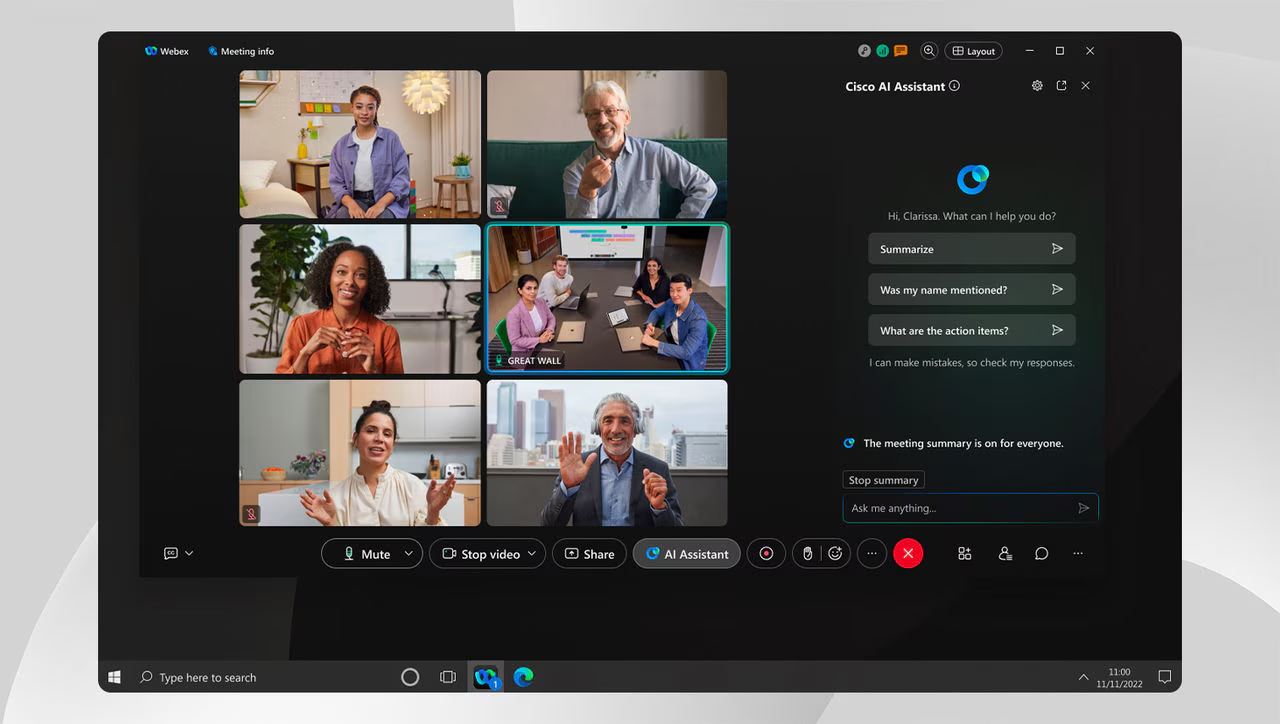
The platform’s scalability for large-format meetings was another differentiator. Reviewers described running training sessions and all-hands calls with over 1,000 participants without stability issues and noted that audio and video quality remained reliable even in low-bandwidth environments.
The interface is one area where reviewers consistently flagged a learning curve. With so many features to explore, new users often described the layout as feeling cluttered or overwhelming at first. Most reviewers noted they adapted with time, and teams that invested in onboarding found the depth of functionality worth the initial adjustment period.
Some reviewers also mentioned that Webex Suite can feel resource-intensive, especially on older hardware or during screen-sharing-heavy sessions. This is worth factoring in for teams with mixed device environments, but it appears to be less of a concern for organizations using modern hardware and stable enterprise networks.
Even with those minor trade-offs, Webex currently holds a 4.2 out of 5 rating on G2. For large, distributed teams that prioritize security, scalability, and automated meeting management, Webex Suite remains one of the most complete AI meeting ecosystems available today.
What I like about Webex Suite:
- The combination of real-time transcription, multilingual translation, and “Catch Me Up” makes it one of the most capable tools on this list for teams that operate across time zones and languages.
- The AI noise cancellation is one of the most reliable I’ve seen in the reviews — it doesn’t just reduce background noise; it keeps audio professional regardless of the environment.
What G2 users like about Webex Suite:
“What I like best about Webex Suite is how it brings meetings, messaging, calling, and collaboration into one platform, making communication much smoother for teams. The audio and video quality are reliable even during large meetings, and features like screen sharing, recordings, breakout rooms, and real-time collaboration make remote work much more efficient. It’s also highly secure and integrates well with enterprise environments, which is especially useful for organizations handling large-scale or client-facing communication.”
– Webex Suite review, Subhashree S.
What I dislike about Webex Suite:
- The interface consolidates a significant amount of functionality, and reviewers consistently described a learning curve for new users. Teams that get past it tend to find the platform’s depth worthwhile.
- Some reviewers also noted that the app can feel heavy on older devices or lower-bandwidth connections. For enterprise teams with modern hardware and stable networks, this tradeoff is less likely to outweigh the platform’s scalability and reliability.
What G2 users dislike about Webex Suite:
“One thing I dislike is that some advanced features can take time to learn for new users. Occasionally, the desktop application can feel resource intensive on older systems. Compared to some competitors, the interface could also be made more modern and intuitive in certain areas.”
– Webex Suite review, Dharamveer P.
Zoom Workplace vs. Webex Suite: What G2 Data shows
Zoom Workplace and Webex Suite both combine AI-powered meeting assistance with broader collaboration capabilities, but they cater to slightly different priorities. Based on G2 Data and reviewer feedback, Zoom Workplace stands out for its ease of use, intuitive interface, and collaboration experience, making it a strong fit for teams that want to get started quickly. Webex Suite, on the other hand, shines in enterprise environments where advanced controls, multilingual collaboration, and large-scale communication infrastructure are top priorities.
Want more details before you decide? Check out our full comparison of Webex vs. Zoom to see how the two platforms compare across pricing, usability, collaboration features, AI capabilities, and enterprise functionality.
4. Krisp: Best for bot-free meeting capture with noise cancellation
Krisp takes a slightly different approach to meeting capture than other tools on this list. Rather than sending a bot into the meeting, it runs quietly in the background on the device — recording, transcribing, and summarizing without ever appearing as a participant.
Noise cancellation is what Krisp is best known for, and G2 Data backs up that reputation. Voice recognition scores 89%, and virtual meeting hosting scores 82%. Reviewers working from home offices described Krisp as filtering out barking dogs, construction noise, crying children, and street traffic, with colleagues on the other end completely unaware (isn’t that what we all really want?).
Accent conversion is another standout capability. Reviewers from global teams noted that it improves clarity in conversations with clients, prospects, and colleagues across regions. Unlike traditional noise reduction tools, Krisp focuses not only on removing distractions but also on making communication easier to understand in real time.
The bot-free recording model was a consistent differentiator in the reviews. Krisp captures meetings entirely on the device, without joining as a visible participant, so external guests never see a notetaker in the attendee list. Reviewers described this as particularly valuable for discovery calls, coaching sessions, and partner meetings where the presence of a bot would have affected the conversation.
Cross-platform compatibility is another reason users choose Krisp. G2 Data scores cross-system integration at 86%, and reviewers confirmed it works across Zoom, Teams, Google Meet, and 800+ other apps without platform-specific setup.
I also noticed many users highlighting Krisp’s ability to automatically start recording, generate transcripts, and create meeting notes without requiring manual intervention. According to G2 Data, automated note-taking scores 94%, reflecting the platform’s strength in reducing administrative work after meetings.
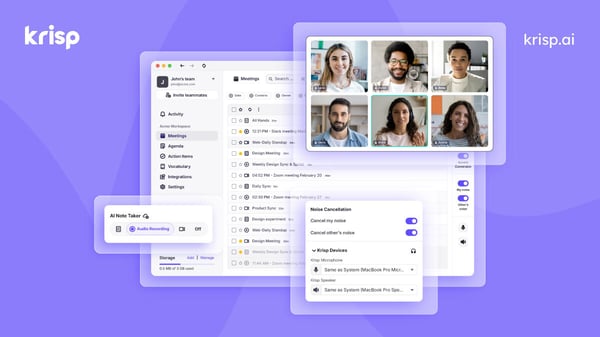
Post-meeting summaries and action items rounded out the experience for most reviewers. G2 Data scores smart summaries at 92% and action item tracking at 90%, and reviewers described using the searchable transcript alongside the summary to reference specific moments from calls weeks later — or to pass full transcripts into Claude or other AI tools for deeper analysis.
Transcription accuracy is one area where some reviewers noted limitations, particularly for non-native English speakers, calls with strong accents, or conversations where multiple people speak simultaneously. A handful of reviewers working across languages mentioned that Krisp occasionally misses words in non-English transcripts — something worth factoring in if precise verbatim capture or multilingual documentation is central to your workflow. For teams where noise cancellation is the primary use case, and transcripts are a secondary benefit, this is rarely a dealbreaker.
A handful of reviewers noted that Krisp’s full feature set is currently limited to desktop, with mobile support not yet on par with the desktop experience. For users who take calls on their phones, it’s worth factoring this into the decision until mobile parity catches up. But for those who primarily use a desktop or dedicated workstation, this makes no practical difference.
Krisp holds a 4.7 out of 5 rating on G2. For professionals who prioritize meeting privacy, clear audio quality, and hands-free meeting documentation, it offers one of the most distinctive experiences in the category.
What I like about Krisp:
- The bot-free capture model solves a problem that most AI meeting assistants quietly sidestep — it keeps the meeting dynamic intact while still capturing everything that matters.
- Accent conversion is a genuinely differentiated feature that addresses a real pain point for professionals.
What G2 users like about Krisp:
“I like that it takes meeting notes for me; I used to have to do it myself, but it was difficult to pay attention, answer questions, and also take notes. It’s really good at removing all noise from the background; sometimes my 4 dogs all bark in the background right next to me, and clients don’t hear a thing. And the dark mode is amazing! I don’t strain my eyes while using it.”
– Krisp review, Angela A.
What I dislike about Krisp:
- Some reviewers reported that transcription accuracy can vary with strong accents, non-English speech, or overlapping speakers. Teams that rely heavily on verbatim capture may want to cross-check transcripts for high-stakes calls.
- Krisp’s full feature set is currently desktop-only, and mobile support isn’t on par yet. For users primarily on laptops, this is not even an issue.
What G2 users dislike about Krisp:
“It can use a noticeable amount of CPU, and it occasionally slows down my computer when I’m running other heavy apps. The transcriptions are inaccurate most of the time, although I rarely need them anyway.”
– Krisp review, Carlos A.
5. Otter.ai: Best for real-time transcription with auto-generated action items
Otter.ai is one of the most accessible entry points for teams that want real-time transcription without a steep setup or learning curve. Reviewing G2 user feedback made clear that it earns its place through a combination of transcription accuracy, automatic summaries, and a free tier generous enough that teams adopt it before ever needing to evaluate the paid plans.
Real-time transcription was the feature reviewers returned to most consistently. G2 Data scores automated note-taking at 91% and voice recognition at 82%, and reviewers described the live transcript appearing on screen as conversations happened — accurate enough across different accents and dialects that most described needing only minimal editing afterward.
What I found really interesting was the transcription search or verbatim quote extraction feature. Many reviewers, specifically from content and marketing teams, described pulling exact quotes from searchable transcripts for LinkedIn carousels, case study write-ups, and client reports. Rather than rewatching recordings or scrolling through pages of notes, teams can retrieve specific details in seconds, making past meetings much easier to reference.
Automated meeting summaries further reduce the administrative work that follows a call. G2 Data shows an 89% score for smart summaries, and reviewers frequently mention receiving concise recaps that surface key decisions, discussion points, and next steps. For teams managing multiple meetings each day, this helps shorten the time between a conversation ending and action being taken.
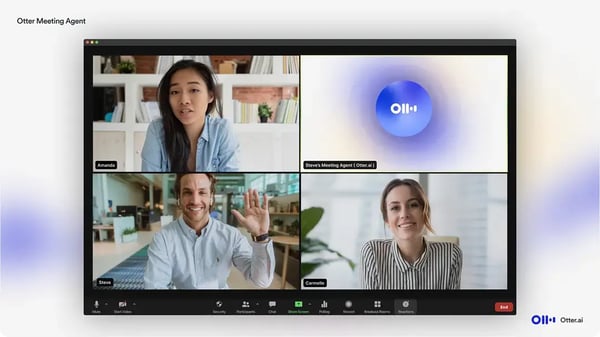
OtterPilot adds another layer of automation by joining meetings, capturing conversations, and automatically distributing summaries. Users managing packed calendars often cite this as one of the platform’s biggest time-saving features because it reduces the need to manually start recordings, take notes, or send recap emails after every call.
Hybrid meeting support also emerged as a differentiator in reviews. Several users described using the Otter mobile app to capture in-person discussions, workshops, and conference room meetings while still generating speaker-attributed transcripts and searchable records. This flexibility makes Otter.ai useful beyond traditional video calls.
At the same time, a handful of reviewers noted that Otter.ai’s summaries occasionally prioritize brevity over completeness — condensing longer or more complex discussions in ways that omit details that mattered. For technical or high-stakes calls, a quick cross-check against the full transcript is worth building into the workflow, but for straightforward meetings, this rarely causes issues.
Reviewers on the free plan flagged that Otter.ai automatically sends meeting summaries to all meeting contacts without prior notification — something that caught several users off guard before they adjusted the settings. It’s worth configuring before the first meeting to avoid unexpected distribution, but it’s also easy to disable once you know where to look.
Otter.ai currently holds a 4.4 out of 5 rating on G2. For teams that prioritize accurate transcription, searchable meeting records, and lightweight meeting automation, it remains one of the most accessible options in the category.
What I like about Otter.ai:
- I like how easy Otter.ai makes it to capture and revisit meeting information. The combination of live transcription, searchable records, and automated summaries helps transform conversations into information that’s actually useful later.
- Otter.ai works really well across both virtual and in-person meetings. The ability to capture discussions on a mobile device gives teams more flexibility than tools designed primarily for video conferencing.
What G2 users like about Otter.ai:
“I love how otter records the meeting summarizes it and also if you ask it to it will highlight the key points of the meeting. It also has a timestamp of what was said and by who.”
– Otter.ai review, Hawa L.
What I dislike about Otter.ai:
- Some reviewers noted that the AI-generated summaries can occasionally prioritize brevity over completeness, particularly during longer or more complex discussions. For straightforward meetings, this doesn’t really hinder the workflow.
- A few users also reported being surprised when meeting summaries were automatically shared with participants before they adjusted notification settings. While the behavior can be customized, it’s worth reviewing sharing preferences before rolling the platform out broadly.
What G2 users dislike about Otter.ai:
“I’ve noticed that when I use Otter.ai during conference talks, it doesn’t always distinguish clearly between different speakers. It also frequently assigns the wrong name to a voice, so I end up spending more time than I’d like going back and editing the transcript.”
– Otter.ai review, Jay G.
Want to see how Otter.ai stacks up against other tools built for prospecting and outreach? Visit G2’s AI Sales Assistant Software category to compare features, pricing, and user reviews.
Frequently asked questions about AI meeting assistants in 2026
Got more questions? G2 has the answers!
Q. What are the best AI meeting assistants for product managers capturing meeting details without manual note-taking pressure?
Fathom and Otter.ai are the best picks. Fathom records, transcribes, and delivers structured summaries with assigned action items the moment a call ends — no manual steps required. Otter.ai’s OtterPilot attends meetings autonomously, making it equally strong for product managers running high volumes of back-to-back stakeholder sessions.
Q. What are the AI meeting assistants that eliminate admin work and allow focus on execution and meeting insights?
Zoom Workplace and Fathom lead here. Zoom Workplace’s AI Companion generates summaries, assigns action items, and automatically distributes them via email or Slack, removing the entire post-meeting documentation layer. Fathom goes further by pushing meeting highlights and tasks directly into HubSpot, Salesforce, Asana, and Zapier, so the output of every meeting flows into the tools where execution actually happens.
Q. Which AI meeting assistants accurately transcribe meetings with proper speaker attribution across remote and in-room participants?
Otter.ai is a good option for hybrid room setups. Placing the app on a phone in a conference room delivers accurate individual speaker tags for every in-person participant, something most tools miss when treating an entire room as a single audio source. Webex Suite also performs well here, with built-in speaker identification that holds up reliably across large distributed calls.
Q. What AI meeting assistants send automatic summaries directly to CRM with draft follow-up emails for immediate use?
Fathom automatically pushes meeting summaries, highlights, and tasks into the right contact or deal records in HubSpot and Salesforce and generates draft follow-up emails ready to send immediately after the call. Otter.ai’s OtterPilot also sends automatic follow-up emails with summaries and action items to all participants.
Q. What are the AI meeting assistants most used by account managers for capturing customer insights and action items during calls?
Fathom is the most frequently cited tool among account managers in the reviews I evaluated. Its real-time bookmarking lets account managers flag deal blockers, product requests, and key commitments the moment they’re mentioned, with custom labels added instantly. Zoom Workplace is a strong option for account managers already running calls on Zoom, with summaries and action items delivered automatically without switching tools.
Q. Which AI meeting assistants handle late-meeting joins and provide catch-up features for team members?
Webex Suite is the clear leader here. Its “Catch Me Up” feature summarizes everything discussed up to the point when a participant joins, without requiring them to ask a colleague or pause the meeting. Otter.ai also supports this through its searchable live transcript, allowing late joiners to scroll back and catch up without interrupting the flow.
Q. Which AI meeting assistants maintain strong integration with Google Meet and Webex platforms without compatibility gaps?
Fathom and Otter.ai both integrate natively with Google Meet, with reviewers consistently describing the connection as seamless — automatic join, no manual setup, and full transcription and summary delivery. For Webex specifically, Webex Suite’s AI Assistant is built natively into the platform, making it the most reliable option for teams already standardized on Cisco infrastructure.
Q. What are the AI meeting assistants adopted long-term by project managers among teams past the first quarter of use?
Fathom shows the strongest long-term retention signals among project managers in the reviews I evaluated. Reviewers managing large engineering and design teams described using it daily across multiple quarters, citing structured summaries and Jira-ready action items as the reasons it became a permanent workflow fixture rather than a trial tool.
Q. What are the highest rated AI meeting assistants for capturing detailed meeting notes and quotes for case study research?
Otter.ai is the best option for research and content use cases. Reviewers described pulling verbatim quotes directly from searchable transcripts for case studies and client reports, without rewatching recordings. Fathom’s “Ask Fathom” is a close second, letting researchers query meeting history by direct question and land at the exact moment in the recording.
Q. What are the most trusted AI meeting assistants by account managers and product managers based on user reviews?
Fathom consistently earns the highest trust scores among account managers and product managers, with a perfect 5.0 out of 5 on G2 based on 5,000+ reviews. Zoom Workplace is the most trusted option for those operating in large enterprise environments, with a 4.5 out of 5 rating from 4,000+ reviews, reflecting consistent performance across team sizes and industries.
Let AI take the notes
Let’s be honest: meetings aren’t going anywhere. But the busywork around them? We can definitely do away with them with the best AI meeting assistants.
After evaluating dozens of AI meeting assistants, one thing became clear: the best tools do far more than record conversations. They capture decisions, surface action items, automate follow-ups, and connect meeting insights to the systems teams already use. Instead of spending time organizing notes or searching through transcripts, teams can move directly from discussion to execution.
The right AI meeting assistant ultimately depends on how your team works. Some tools prioritize simple, hands-free note-taking, while others focus on enterprise analytics, deep integrations, sales intelligence, or collaborative meeting workflows. The key is choosing a platform that fits naturally into your existing processes and helps reduce the administrative burden of meetings.
As AI continues to evolve, meeting assistants are becoming more than transcription tools — they’re emerging as knowledge hubs that preserve context, improve accountability, and help teams act faster. The best solution isn’t necessarily the one with the most features; it’s the one that turns your conversations into meaningful outcomes with the least amount of effort.
And if you want to explore beyond AI meeting assistants, take a look at the best video conferencing software in 2026 to see how the platforms powering your meetings stack up against each other.